
What to Look For in a GEO Service Provider Before You Sign On
Reads 492
31 Oct. 2013 - Michael Simonetti, BSc BE MTE - Total Reads 14,134

This setup advice may help other, but mainly apple offices with multiple staff members, using some PC and some Android devices. This shows the complexity of getting the services mix exactly right, while many of us deal with imperfect systems on a daily basis and cry out ‘why can’t apple or gmail or someone get this right for us!’ The truth is it is complex for them also, as devices and computers and software changes rapidly, the ability to keep up and provide consistent service across multiple platforms is obviously near impossible. Our goal was to sync office computers data and to have the most consistent functionality from each software platform (best representing our company online) across;
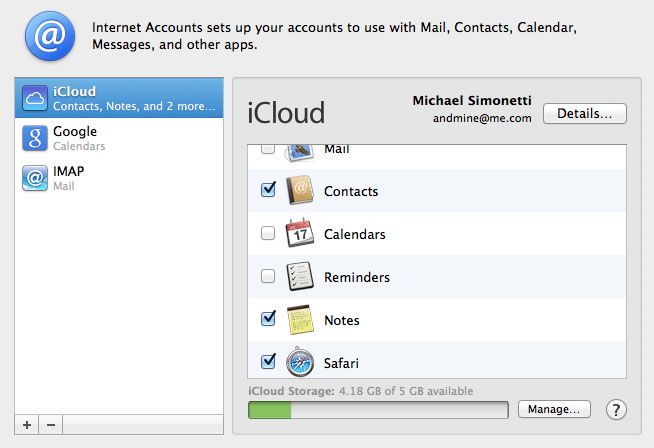
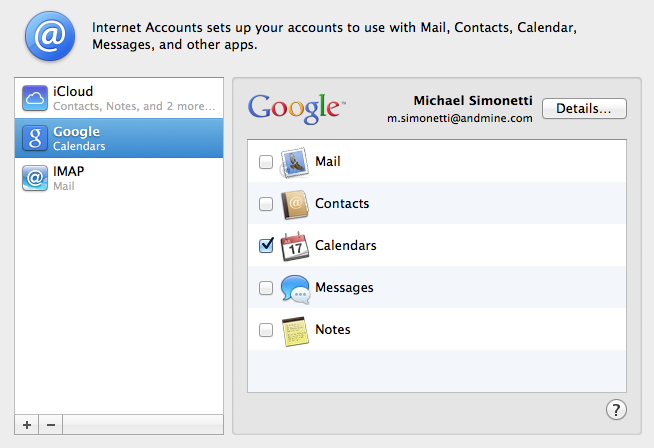
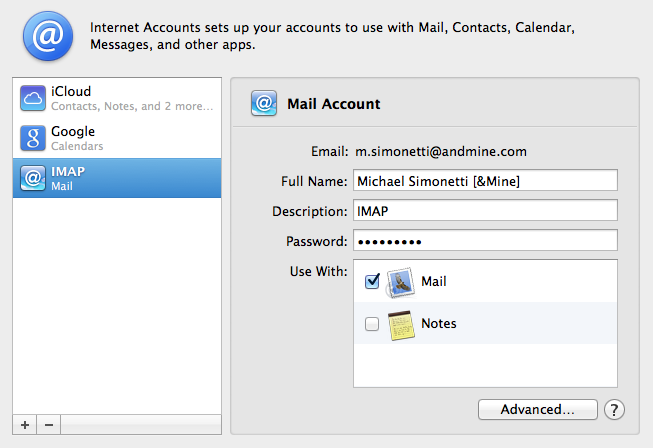
We have most of our office running Apple Mac Destops, Latops, iPhones and iPads. These are quite easy to sync Calendars, eMail, Contact and Notes Individually however, as soon as you want to synconise other devices (PC, android devices, even iPhones properly) and multiple team members, it gets super clunky – things start to fall over. We know as we’ve tried every solution possible, setting up Mircosoft Exchange Server, trying Google Apps exclusively and also setting up our own internal OSX Server – none of these solutions by themselves provide an elegant, fully working solution for all of; Files, Calendars, eMail and Contacts over the air. So instead we worked out it is best broken up into the following solutions; Noting the Software we use (In Brackets) is just as important in these choices – as they are part of the consistent solution. Screenshots from system preferences follow so you can see how each is ticked.
1. Calendars – (Running iCal and Google Calendar) – Set this up Google CalDev (apps) – you need to setup all your staff members to use google apps (small fees may apply) but you only actually need to sync with gmail calendars. I know what you are thinking, why don’t we sync email and contacts also – you can, BUT things don’t work perfectly. Eg. Email – try syncing your new iPhone – it doesn’t allow control over where folders sit properly, it is slower than IMAP and there is an issue with where invites are sent from for Calendar (they come from gmail, not our preference iCal). You can add the CALDEV or Google Calendar account in apple’s System Preferences. This is stable across most new versions of OSX. Settings are simple once your Google Apps account for your company is setup. You can do that via admin.google.com you may need to start an account. It is $50 per user per year (worth it).
2. Email. (Running any of Apple Mail, iPhone, Android, iPad) We’ve tried lots of solutions here; the absolute easiest for us on OSX is a good IMAP service with SMTP included. The reason is Gmail tends to take too much control of the email account (even with Google Apps set to your domain correct eg. @your-domain.com) and there are slight functionality issues across Apple Mail and iPhone which cause even more inconsistencies.
3. Contacts and Notes. Sync separately (not connected to any of the above) via iCould; I recommend using another email address (not from your domain as it will conflict with email, apple provide these for free for individual) It is stable, updates Notes correctly on OSX and keeps the all important (Me) address book card in the correct state. Make sure you set the Me Card in Address Book as your IMAP email address (check: Go To My Card, it should have your company name@your-domain.com email address) as all you iCal invites will come from the correct place. iCloud also comes with other nice features like find my phone and laptop – just stay clear of mail and calendar options. You would think they would get Calendar sync working properly for multiple users, but once again it falls over once you try and share to the Android phone users in the office (so limits a full solution).
4. File Sharing – (Dropbox + OSX Server or File Sharing on the fastest computer with specific Hard Drive for File Sharing). We run a single instance of OSX server, but you can run file sharing on a machine if you don’t have one spare. Dropbox allows us to synconise in the cloud but it is only connected via the File Sharing Hard drive – this way we sync to one place and then push to Drop-Box. If you need to add or download files out of office – I recommend using the Web Services only, otherwise your local machine tries to sync the Dropbox folders back to your local computer … which means you are doubling up on the File Server, which provides lightening speed and no wastage of ISP bandwidth.
Hope this has helped some of you – any Questions – feel free to ask away below –
Go on, see if you can challenge us on "Sync Office Computers – How to Sync Calendar, eMail, Contact and Notes on Apple OSX" - Part of our 184 services at AndMine. We are quick to respond but if you want to go direct, test us during office hours.
Add Your CommentIt is great working with such a dedicated and competent team in this ever changing space and I would highly recommend Michael and his work. Stephanie Clayton, Marketing Services Manager, Ego Pharmaceuticals
More Testimonials